PPC
13 Google Ads Mistakes That Are Quietly Draining Your Budget
You're spending money on Google Ads. Maybe a little, maybe a lot.
And somewhere between launching your campaigns and checking your results, you get the sinking feeling that something isn't working, but you can't quite put your finger on what.
Here's the uncomfortable truth: most Google Ads accounts we audit are bleeding budget in ways that are completely invisible to the people running them. Not because those people aren't smart. But because Google has gotten very, very good at making it easy to set things up wrong, while making it look like everything is fine.
I've spent years managing paid media at scale, and I see the same mistakes over and over again. Some are setup errors that happen on day one. Some are optimization sins of omission that build up slowly over time. All of them cost real money.
So here are the 13 most common Google Ads mistakes I see, and more importantly, what to do instead.
Mistake #1: No Conversion Tracking At All
Let's start here because everything else depends on it.
If you don't have conversion tracking set up, Google has absolutely no idea what's working. It's like hiring a salesperson and never telling them what you actually sell. They'll stay busy. They will call people up, have conversations. But that is about it.
Without conversion tracking, Google can't optimize toward the outcomes that matter to your business. It's just spending your budget and hoping for the best. And hope, as they say, is not a strategy.
What to do instead: Set up Google Ads conversion tracking before you spend a single dollar. At minimum, you want to track form submissions or phone calls (or both), or a credit card swipe for a purchase that represents a real lead or sale. Google Tag Manager makes this manageable even if you're not a developer. If you're using a CRM, even better, you can import offline conversions to close the loop even further. Or if you're using software like Shopify or HubSpot, they also make it very easy, even if you aren't a developer.
Mistake #2: Tracking the Wrong Conversions
This one is sneaky because it looks like you have conversion tracking. Technically, you do. You're just tracking the wrong thing.
The most common culprit? Button clicks. Specifically, tracking a "Contact Us" button click as a conversion, even when the person never actually filled out the form. You're counting interest, or potentially nothing if it was an accidental click, not action.
Other offenders: page views, scroll depth, time on site. These are engagement signals. They're not conversions. When Google optimizes toward a button click, it will find you a lot of button clickers. Congratulations, your conversion rate will look great and your actual business results will not.
What to do instead: Only count actions that represent real business outcomes. A form submission confirmed by a thank-you page. An actual phone call to your business. A purchase. If the conversion event could happen without the user actually doing what you want them to do, it's not a real conversion event.
Mistake #3: No Down-Funnel Optimization (All Leads Look the Same to Google)
You've got conversion tracking. You're tracking real leads. You're ahead of 90% of advertisers already. But here's where it gets interesting.
If that is where you stop, Google sees all your leads as equal. That $5,000 customer who filled out your form? Same as the tire-kicker who called to ask one question and disappeared. To Google's algorithm, a lead is a lead is a lead.
If you're not telling Google the difference between leads, it will optimize toward volume, not quality. And you'll end up with a lot of leads that don't close.
What to do instead: Feed quality signals back to Google. If you use a CRM, you can import conversion data that tells Google which leads turned into actual customers, and even assign values to different outcomes. This is called offline conversion tracking, and it's a game-changer for accounts that care about lead quality, not just lead volume. At minimum, if you have multiple conversion actions, use "primary" and "secondary" designations to tell Google what to prioritize. This is the easiest path to success, giving Google exactly what you want every time to optimize off of.
Mistake #4: Wrong or Ineffective Bidding Strategy
Google wants you to use automated bidding. And honestly? In the right circumstances, automated bidding is great. The problem is when people choose a bidding strategy without understanding what it actually optimizes for, or before their account has the data to support it.
The most dangerous scenario: using Target CPA or Target ROAS bidding before you have enough conversion history. Google recommends at least 30–50 conversions in the last 30 days before switching to these strategies. Without that data, the algorithm is essentially guessing. Expensively guessing.
On the flip side, staying on Manual CPC forever when your account has plenty of conversion data is leaving efficiency, and lots of revenue for you, on the table.
What to do instead: Match your bidding strategy to your account's maturity. Early stage with limited conversion data? Start with Maximize Clicks, or Manual CPC. Once you've accumulated enough conversions, layer in Maximize Conversions or conversion value, and then eventually Target CPA or Maximize Conversion Value with a target ROAS.
Mistake #5: Location Targeting Set to "Presence or Interest"
This is one of my personal favorites to find in an audit because it's so easy to miss and so expensive when you do.
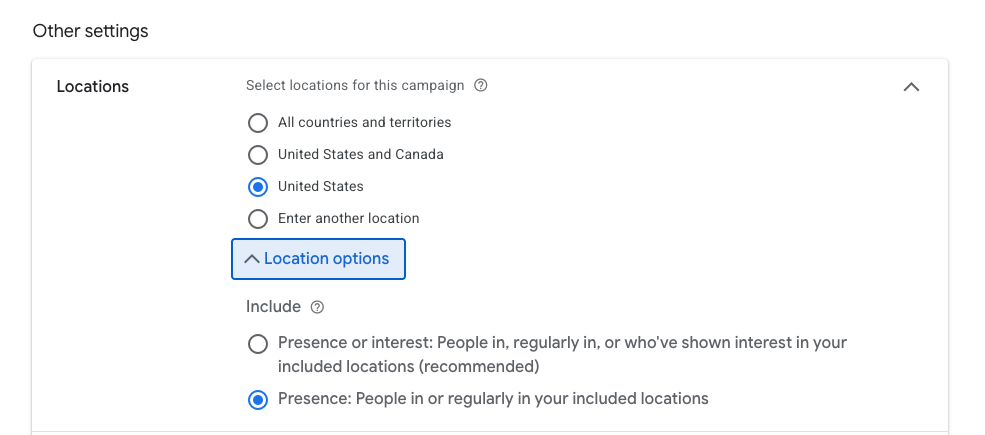
When you set up a Google Ads campaign and target a specific location, say, Dallas, Texas, there's a little dropdown under "Location options" that most people never touch. The default setting is "Presence or Interest," which means your ads show to people in Dallas, and people who have recently searched for or shown interest in Dallas.
Sounds fine in theory. In practice, let's say you own a garage door repair company in Dallas. If you have that setting, it means you're paying for clicks from people who googled "garage door repair" from their couch in England, because potentially they are a fan of the Dallas Cowboys for "American Football."
For local businesses, service-area businesses, or anyone whose customer needs to physically be somewhere to use what they're selling, this setting is a quiet disaster. Even for ecommerce where you only ship to specific locations.
What to do instead: Change your location targeting to "Presence" only. This limits your ads to people who are actually in your target area, which is almost always what you actually want.
Mistake #6: Running Ads Outside Your Business Hours
Picture this: it's 11pm on a Saturday. Someone searches for your service, clicks your ad, and lands on your website. You pay for that click. They call the number. Nobody answers. They move on and call your competitor who is open 24 hours. Or potentially no one else is open either. But they forget all about you and then Monday morning rolls around, and they search again but this time your competitor shows up in the query instead of you.
You just paid to lose a lead.
For any business that relies on calls, form responses, or any kind of human follow-up to close a deal, running ads 24/7 is often just running a campaign for free money for Google. Local service businesses, law firms, medical practices, home services companies, call centers, if nobody's available to respond, you're burning money on leads that go cold before you ever see them.
What to do instead: Set an ad schedule that mirrors your business hours (plus a reasonable buffer for form submissions that might come in just before close). In Google Ads, go to your campaign settings and select "Ad Schedule" to set specific days and hours. If you have enough data, you can also layer bid adjustments, bidding up during your highest-converting hours and down during lower ones. And if you are committed to running ads 24/7, either invest in a Virtual Assistant who can answer calls for you, or get an AI answering tool like Allo's AI receptionist.
Mistake #7: Search Partners Turned On (The Silent Budget Killer)
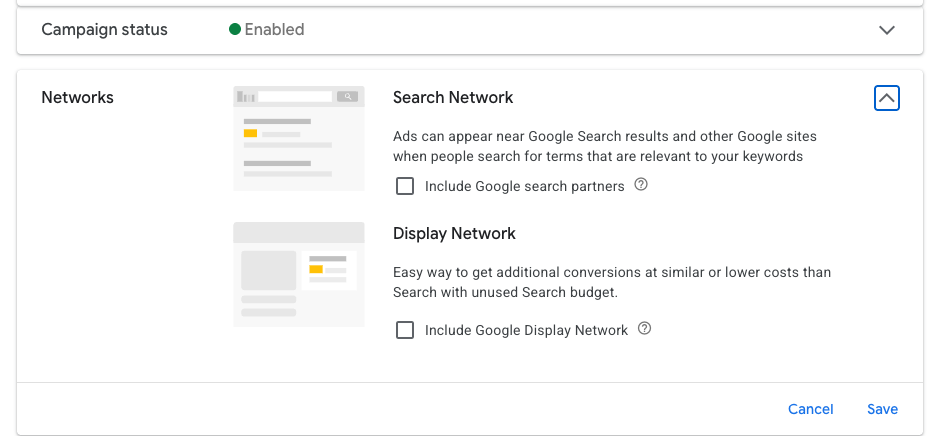
Google Search Partners is a network of third-party websites that show text ads alongside their own search results. We're talking sites like AOL (yes, still), Ask.com, and various other search engines and directories that most people haven't thought about since 2009. Even mobile app games.
By default, Search Partners is opted in for every new campaign.
In most accounts we audit, Search Partners is generating very low cost clicks at a much higher CPA and lower conversion rate than Google Search itself. Sometimes the CPA actually does look great, but that's with accounts who are missing proper conversion tracking and the conversions are low quality and essentially junk.
What to do instead: Check your "Networks" data in the campaign view to see how Search Partners is performing compared to Google Search. If the CPA is higher and volume is meaningful, turn it off. In campaign settings, it's a simple checkbox under "Networks." When in doubt, run Search Partners as a separate campaign so you can control the budget independently.
Mistake #8: Performance Max Without Proper Signals
Performance Max (PMax) is Google's everything-campaign. One campaign, all placements, Search, Display, YouTube, Gmail, Maps, Discover. You hand Google your assets and your goals, and the algorithm figures out where to run.
The pitch is compelling. The reality, without proper setup, is that you end up with a campaign that spends the majority of its budget on Display and YouTube, cheap inventory that feels like it's doing something but converts at a fraction of what Search does. Meanwhile your Search impression share on the terms that actually matter… tanks.
The reason this happens is that PMax requires strong audience signals and asset quality to work properly. Without them, Google defaults to whatever inventory is cheapest and easiest to spend on. And cheap Display clicks feel like volume right up until you check what actually converted.
What to do instead: Feed PMax every signal you have. Upload your customer lists. Add your website visitors as audience signals. Use your best-performing remarketing audiences. Provide high-quality creative assets, not stock photos and generic headlines. And critically: use brand exclusions and Search themes to guide the algorithm rather than giving it a completely blank canvas. And most importantly, give it great conversion signals. Ensure your conversions actually bring real business impact. PMax can be great. PMax on autopilot is usually not.
Mistake #9: Not Sending Traffic To A Landing Page
You write a great ad. Someone searches for exactly what you offer. They click. And they land on… your homepage.
Your homepage is for everyone. Which means it's optimized for no one in particular. It has your full navigation menu, five different CTAs, information about every service you offer, a blog link, and an About Us section. The person who clicked your ad looking for one specific thing now has to go find it themselves, and most of them won't bother.
Message match matters. If your ad says "Emergency Plumbing Services — 24/7 Available," the page they land on should say the same thing. Same offer, same language, same urgency. Every step of mismatch between your ad and your landing page is a conversion rate leak.
What to do instead: Build or designate dedicated landing pages for your ad campaigns, especially your top-spending ones. At minimum, the headline and primary message of the landing page should mirror the ad. Ideally, you're removing distracting navigation, tightening the page to one clear CTA, and making it dead simple for the visitor to do the one thing you want them to do. Tools like Unbounce, Instapage, or even a simple custom page on your existing site work fine. The point is specificity.
Mistake #10: Not Monitoring Your Search Terms Report
This might be the most important one on this list. Read it twice.
Your keywords tell Google what you want to show up for. Your search terms report shows what Google actually showed your ads for and, ultimately, what you actually paid for. These two things are often very, very different.
Broad match keywords in particular can take your ad and match it to searches that are only loosely related, sometimes embarrassingly loosely related. An HVAC company targeting "air conditioning repair" on broad match could end up paying for clicks on "air conditioning window unit reviews," "DIY AC repair Reddit," or "air conditioning jobs hiring near me."
If you're not regularly checking your search terms report, you have no idea what you're actually paying for. And based on most accounts we've seen, the answer is: a lot of things you shouldn't be.
What to do instead: Check your search terms report at least once a week. Filter for search terms with clicks (and especially spend) that aren't relevant to your business. Add the bad ones as negative keywords. This is table stakes, it's not advanced PPC, it's basic account hygiene. And yet it's missed constantly.
Mistake #11: No Negative Keywords
This follows directly from the last one, but it deserves its own entry because it's a different problem.
Monitoring your search terms report is about discovering what you're paying for. Building a negative keyword list is about preventing bad traffic before it happens.
Negative keywords tell Google: "No matter what, don't show my ads for this." Common ones that almost every account should have from day one: "free," "jobs," "careers," "DIY," "how to," "Reddit," "reviews," depending on your business.
A new campaign with zero negative keywords is basically an open invitation. You're telling Google's matching algorithm to do whatever it wants with your budget, and Google is happy to oblige.
What to do instead: Before you launch any new campaign, build a starter negative keyword list. Think about all the ways someone could search for something related to your business but not be a potential customer. Job seekers, researchers, students, competitors, people looking for free stuff. Add those as negatives. Then layer in more from your search terms report over time. Negative keywords are one of the highest-ROI activities in Google Ads, they protect your budget without requiring you to spend more.
Mistake #12: Accepting Google's Recommendations (or Auto-Apply)
Google's Recommendations tab is full of helpful suggestions. Add more keywords! Expand to broad match! Increase your budget! Opt into Display expansion!
Some of these are fine. Many of them are not. All of them are designed with Google's revenue in mind, much more so than your actual business outcomes. Those two things aren't always the same.
The Recommendations tab has an "Optimization Score" that goes up when you follow the recommendations and down when you dismiss them. This score means nothing. It is not correlated with account performance. It is a psychological nudge to get you to spend more and give Google more control.
The most dangerous feature is Auto-apply recommendations, where you give Google permission to make changes to your account automatically. I have seen this setting single-handedly blow up campaigns that were working perfectly fine. Budgets expanded. Match types changed. New keywords added. All without the advertiser knowing until they checked their bill.
What to do instead: Turn off auto-apply recommendations. Full stop. Go to Tools → Recommendation settings and make sure nothing is set to auto-apply. Review the manual recommendations occasionally, some are legitimate, but evaluate each one against your actual account goals, not Google's optimization score.
Mistake #13: Poor Ad Rank
Ad Rank determines where your ad shows up, and whether it shows up at all. It's calculated based on your bid, your Quality Score (which includes expected click-through rate, ad relevance, and landing page experience), and a few other factors like auction competitiveness.
Here's why this matters more than most people realize: a higher Quality Score means you can achieve the same (or better) ad position at a lower cost-per-click than a competitor with a lower Quality Score. In other words, ad quality is literally a cost reduction strategy.
Accounts with poor ad rank are either not showing up for the searches that matter, or they're overpaying every time they do. Both are expensive problems.
The most common causes of poor ad rank: ads that aren't relevant to their ad groups (generic copy dumped into every campaign), landing pages that don't match the search intent, and keyword-to-ad-group groupings that are too broad.
What to do instead: Check your Quality Score at the keyword level. Google shows you scores from 1–10 for each keyword, along with component scores for expected CTR, ad relevance, and landing page experience. Use that as your guide. Tighten your ad groups so each one focuses on a tight theme. Write ads that speak directly to the keyword intent. And make sure the landing page delivers on what the ad promises. Higher Quality Score = lower CPCs = more budget to work with. It's the virtuous cycle you want to be in.
Fix These and You're Already Ahead of Most Advertisers
None of these mistakes are exotic. They don't require advanced certifications or secret industry knowledge to fix. They require attention, intention, and a willingness to actually dig into your account instead of just watching the top-line numbers.
The reason these mistakes persist, in small accounts and large ones alike, is that Google's interface makes them easy to miss, and the platform is perfectly happy to let them slide. More wasted spend on your end is more revenue on theirs.
If you read through this list and recognized your own account in more than a few of them, don't feel bad. You're in good company. The good news is that fixing even half of these will likely have a meaningful impact on your results without spending another dollar more.
And if you'd rather have someone else dig through your account and fix it for you, well, that's kind of what we do at daylyte. Just saying 😏