Paid Media
Why Your Google Ads Campaigns Aren't Converting (And the 3-Part System to Fix It)

Running Google Ads without CRO and CRM signals is like reading the first third of a Stephen King novel and thinking you know how it ends.
Something's definitely happening. But you're missing the part where everything comes together, and the part where it all goes wrong.
(Yeah, I read a lot of Stephen King 😆 IYKYK: you never know how the book is going to end.)
Google Ads is one part of a three-part equation. Most campaigns have the first part dialed in. They have the campaign, the ads, the keywords. Money is being spent.
Yet where are the results? 🤷♀️
The results come from three parts working together. Each one is simple, but they all have to work together:
This isn't simply a framework that we talk about. It's a requirement we have for every client that we work with.
If all three parts aren't in place, we won't run campaigns. Not because we're difficult, but because we've seen what happens when a piece is missing.
We can't do our best work, and more importantly, your budget doesn't stand a chance.
Let's get into it! It's a long one, so use the map below to skip around.
Part 1Traffic: Getting the Right People to Click
The first thing you might think of when building a Google Ads campaign is "what keywords should I choose?"
When in fact, you should be thinking about the audience. WHO are you trying to reach, and WHAT are they looking for when they head to Google to search?
You gotta get this part right first. Because if you don't understand intent, everything else works against you: the keyword, the ad, the landing page, the budget.
Before we get into the specifics: if your campaigns are already running and something feels off, Matt wrote a post on the 13 most common Google Ads mistakes we see in audits, and it's worth a read alongside this one. A lot of what he covers lives in this Traffic section. We're not going to repeat all of it here, but we'll reference it where it's relevant.
In this section:
Search Intent: know who you're writing the ad for
Search intent is the goal behind a search: what the person typing into Google is actually trying to accomplish in that moment. Every other decision in your campaign gets built on how well you read it.
I think this is my favorite part of building a campaign. There's something genuinely fascinating about trying to get inside someone's head at the exact moment they're typing into Google.
Think about it. That search bar is one of the most honest places on the internet. Nobody performs for Google. They just type what they actually want, what they're actually worried about, what they're actually trying to fix. Your job is to meet them there.
This comes before you touch a keyword, choose a bid strategy, or open a single campaign setting. You're answering the question:
"What is this person trying to do right now?"
That's search intent.
Getting this wrong is one of the most costly mistakes you can make in a campaign. I've seen beautifully put together campaign structures, Dribbble-worthy landing page designs, and the right bidding strategy still throw money away, because they were showing up for the wrong moment in someone's decision process.
There are 4 types of search intent:
- Informational: they're looking for answers
- Navigational: they're looking for a specific place
- Commercial: they're comparing options
- Transactional: they're ready to act
Now here's where most Google Ads guides will tell you to focus only on Transactional. And honestly? For most campaigns, they're right.
But it depends on what you're trying to accomplish.
For leads and volume, go with Transactional. These are people ready to act right now.
Building brand awareness or launching something new? Informational and Commercial intent have their place too. You might need to show up earlier in the conversation, before people even know they need what you're selling.
Know your goal first, then decide where to play.
For most of our clients, we start at the bottom of the funnel and build outward.
BOFU first: the people who are ready to book the demo, start the trial, buy the product. Get that low-hanging fruit converting profitably. Then expand to MOFU and eventually TOFU once you have the budget and the data to support it.
Don't cast a wide net from day one. Wide nets catch a lot of things you didn't want.
One more thing worth calling out before we move on: search intent shapes what your landing page needs to do too. A Transactional searcher needs a clear offer and a clear next step. They don't need more education. They need a reason to choose you. We'll get into that in the Conversions section. 👇
Campaign & Ad Group Structure
If search intent is about understanding your audience, campaign and ad group structure is about organizing your account so Google can do its job well.
Avoid fighting the algorithm by messing this up. When you get this right, you see it reflected in your Quality Score (QS), your CPCs, and your conversion rate.
Remember this: one theme per ad group.
Keywords in an ad group
↓
Ads in that ad group
↓
Landing
page in that ad group
They should all be speaking the same language.
There's a reason this matters. Google grades your ads on relevance. The more aligned your keywords, ads, and landing pages are, the higher your Quality Score. The higher your Quality Score, the less expensive your CPCs are.
A few structural things to get right from the start:
Campaigns define your budget and goals. Each campaign has one business objective and one budget.
If you're a home services company running HVAC and plumbing ads, those are two separate campaigns. Not two ad groups in one campaign. Mixing the two into one can muddy up your budget and your data. You have less control.
Same applies to geo. You may not want to combine Nebraska with California. Each state has a different level of performance.
Ad groups define your intent clusters.
In your plumbing campaign you might have 3 ad groups:
- Emergency plumbing
- Drain cleaning
- Water heater repair
I can tell you from personal experience: the first week we moved into our new house, our main line backed up. I wasn't browsing. I wasn't comparing. I was searching "emergency plumber" from my phone while standing in an overflowed bathroom 😬
I clicked the first ad that told me they were available now and served my area. That's it. That's the whole decision.
That's what being in the right ad group does. It puts you in front of the right person at the right moment.
Each of these ad groups gets its own tightly defined keywords, its own ads, and its own landing page.
Searching for emergency services, I don't want to see an ad for getting my water heater repaired. That's a quick bounce from that ad and onto your competitor's ad, which is promising same-day fixes.
Keywords define who triggers your ads. And this is a nice segue into the match type conversation. Because how you set up your keywords is just as important as which keywords you choose.
Match Types: Exact, Phrase, Broad
This is one of the most misunderstood areas of Google Ads. And one of the most frustrating changes since I've been managing Google Ads.
Google has changed how these match types work over the years, and it's confusing for marketers and regular folks alike. It doesn't make it easier that Google nudges everyone toward Broad Match at every opportunity.
Remember, Google is a company trying to make money. Broad Match is one way of doing it. Approach this with extreme caution.
Exact Match. Don't let the name fool you, it's not "exact" anymore. Your ad may show when someone searches for your exact keyword or a very close variant.
[emergency plumber] may show for "emergency plumber" or "emergency plumbers near me"
→ Highest control, lowest volume.
Phrase Match. Your ad may show when someone searches for your keyword as part of a longer query.
"emergency plumber" may show for "best emergency plumber in yorba linda" or "emergency plumber near me"
→ Middle ground on control and volume.
Broad Match. Your ad may show for any search that Google decides is related to your keyword.
Emergency plumber on Broad Match may show for "plumbing DIY tips", "plumber careers", or "how to fix my broken faucet".
None of these are your customer. All of them cost you money.
Broad Match isn't "bad". But it's a tool that earns its place. It doesn't start there.
| Match type | Control | Volume | When to use it |
|---|---|---|---|
| Exact | Highest | Lowest | Day one, for your core money keywords |
| Phrase | Middle | Middle | Day one, alongside Exact |
| Broad | Lowest | Highest | Only after you've maxed out Exact and Phrase, with conversion data and a strong negative list in place |
The practical approach: Start with Exact and Phrase Match. Build your negative keyword list to protect your intent. Make the search term report your BFF. Let your account accumulate real conversion data. Then, and only then, consider Broad Match. We recommend it when you've maxed out your spend on Exact and Phrase and you're looking to add more volume to the funnel. Prove the economics first. Then expand 🚀
The Search Term Report: your most underused tool
When we do an audit of a client's account, we call it "taking a peek under the hood". This is where we find a TON of broken pieces.
I can't tell you how many accounts I've seen where this report is actively ignored. And it can be the quickest way to deplete your budget.
The mistake we see is people assuming that it ends at the keyword level. You've chosen the keywords and mistakenly think that's all people are looking for and all that Google is charging you for.
Your keywords tell Google what you want to show up for.
Your search term report shows what Google actually showed your ads for.
In this report, you may find searches you never would've thought of. We've seen some crazy searches in our time. Some that make you laugh, some that make you cringe, and some that make you question humanity 🤦♀️
The search term report is where reality lives.
Here's how to find it: Google Ads → Campaigns → Insights & Reports → Search Terms
Add in the date range. We filter first by spend to see what clicks we're getting, and then by impressions to see just how often someone is typing that search in.
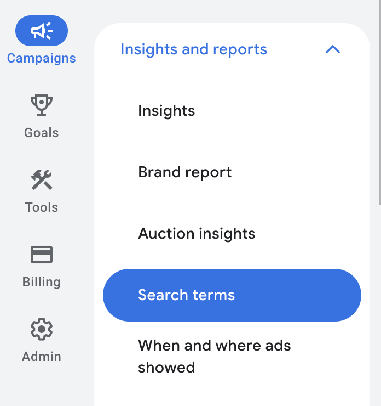
Here's what to look for in this report:
- Searches that are draining your budget but have nothing to do with your business: "plumber jobs near me", "diy faucet repair", "plumbing store near me"
- Searches that are converting well that aren't in your keyword list yet. This is gold! And sometimes the part of the report that people miss. Pull these search terms out of your report and add them as Exact or Phrase Match keywords in your ad group.
- Searches that show how people are really describing their problem. If you keep seeing the same phrasing show up, that's the language your customers actually use. Fold it into your ad copy and your landing pages, and watch your relevance (and Quality Score) climb.
Negative Keywords: protecting your budget
If the search term report shows you what's happening, negative keywords are how you prevent it from happening again.
They're your filter.
They tell Google: no matter what, do NOT show my ads for this.
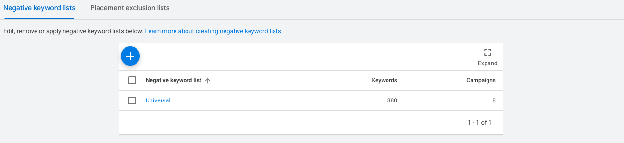
Before you even launch your first campaign, you'll want to build a universal negative keyword list.
Building a universal negative keyword list
Create a starter list before you launch anything. There are terms that almost every account should exclude from day 1, regardless of industry:
- free, cheap, discount (unless that's your offer)
- jobs, career, hiring, salary
- DIY, how to, tutorial, reddit
- reviews (depending on your offer)
- near me (if you're not local)
Beyond the universal list, you'll want to build industry-specific negatives. For a plumber:
- "plumbing supply"
- "plumber costume"
- "plumber salary"
Ad group-level vs campaign-level vs account-level negatives
You can get even more granular with your negative keyword lists. It's worth knowing how these work so that you can apply them in the right place.
Ad group-level negatives: The most granular option. These are useful when you have two ad groups inside the same campaign that could theoretically compete with each other. For example, if you have one ad group for "emergency plumber" and another for "drain cleaning", you'd add "drain" as a negative at the ad group level of the emergency ad group so the two don't overlap and cannibalize each other's traffic.
Campaign-level negatives: Apply only to the campaign you attach them to. Use these for terms that might be relevant in one campaign but not another. If you're a plumber who operates in different geos, you might have a campaign in California and one in New York. You can apply the negative keyword "California" in your New York campaign.
Account-level negatives: These apply across every campaign that you attach them to.
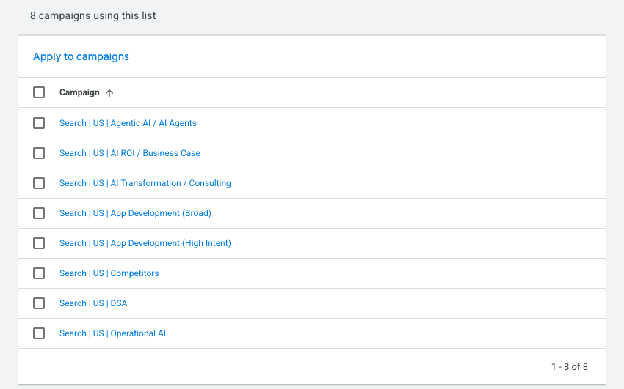
It's very important to remember that you have to apply the list to your campaigns. It's not enough to just build it. I've seen this in so many audits: the list is created but never applied, letting in so many bad search terms. That equals wasted money.
Negative match types: which one to use and when
Most people don't realize negative keywords have match types too. Here's how to think about them:
Broad match negative: blocks any search containing that word, in any order, in any variation. This is what you want for most negatives. Add free as a broad match negative and you'll block "free plumber", "free plumbing estimate", and "free pipe repair" all at once.
Phrase match negative: blocks searches containing that exact phrase in that order. Use this when broad is casting too wide and accidentally blocking traffic you actually want.
Exact match negative: blocks only that precise search and nothing else. Use this for surgical precision on specific terms you want to exclude without touching anything around them.
The rule of thumb: start with broad match for most negatives. Phrase and Exact are for fine-tuning when broad is getting in the way.
Part 2Conversions: Turning Clicks Into Leads
Okay, awesome. You've done everything right up to this point.
✅ Your campaign is well structured
✅ Your keywords are tight
✅ Your search term report is clean
✅ And people are clicking
Then… crickets.
Nothing is happening.
This is where campaigns quietly die. The traffic is right, but the page wasn't ready for it. Getting someone to your page is only half the battle. What the page does with them is the other half.
In this section:
The Ad Itself: Writing a Compelling Ad
Your ad has one job before any other: earn the click from the right person.
An ad that's well written pre-qualifies your audience before they even get to the landing page. This means better leads, better conversion rates, and less wasted spend.
Here's what you're working with in a Responsive Search Ad:
- Headlines: up to 15, 30 characters each
- Descriptions: up to 4, 90 characters each
It's not a lot of real estate, so every word has to earn its place.
Write headlines that speak to the search, not the product
The person who just typed "emergency plumber Orange County" doesn't need you to tell them what a plumber is. They need to know you're available right now, you serve Orange County, and you're worth clicking. Lead with what they care about in this moment, not what you want to say about your business.
Good: OC Emergency Plumber | Available 24/7 | Licensed & Insured
Less good: Smith Plumbing Co. | Serving OC Since 1987 | Call Us Today
The first one answers the search. The second one talks about the business. Your customer cares about one of those things right now.
Pin your most important headlines
Google will mix and match your headlines in combos you don't always control. For headlines like your location, your service, and your CTA, pin them to positions 1, 2, or 3 so they're always showing.
Use your descriptions to handle objections
Your headline got the attention. Your descriptions are where you build the trust.
Think about what's stopping your audience from clicking: price uncertainty, availability, legitimacy. Address it directly.
Licensed OC plumber available 24/7. Upfront pricing, no surprises. Most repairs done same day. Call now or book online.
That description answers four objections in 90 characters. That's the job.
Don't use all your headlines to say the same thing
Write headlines that cover different angles:
- Your services
- Your location
- A proof point
- A CTA
- A differentiator: what makes you better than the other 20 plumbers down the street?
Google finds the combinations that resonate with different searchers. If all your headlines say "the best plumber in OC", you're not giving the algo much to work with.
Message Match: Keeping the Promise Your Ad Made
Here's a scenario I've seen over and over…
Someone searches for "emergency plumber OC" and clicks the ad that says exactly that in the headline. Then they land on a page talking about 30 years of experience, the full range of services and locations, and a navigation with 8 things to click on.
The ad made a specific promise. The page didn't keep it. So the visitor bounces.
You just paid for the right person, and they left without calling you.
Message match is the principle that every element on your landing page should reflect what your ad said:
- The headline
- The offer
- The CTA
Same language. Same urgency. Same intent.
The tighter the match, the higher your conversion rate. Yeah, it's that simple.
Here's what it looks like:
- Ad headline says "OC Emergency Plumber" → landing page headline says "OC Emergency Plumber, Available 24/7"
- Ad description mentions upfront pricing → landing page mentions upfront pricing above the fold
- Ad has a "Call Now" CTA → landing page has a phone number above the fold. Extra points if you make the phone number sticky at the top as someone scrolls down on mobile.
Every step of mismatch between your ad and your landing page is a conversion leak. And unlike a lot of conversion problems, this one is within your control.
Matching the Offer to Where They Are
Even with the same keyword, the same click on an ad, and the same landing page destination, not everyone who gets there is in the same place mentally.
One might be ready to book now, and the other needs a little bit more before they can commit. Sending them both to the same high-commitment "Book Now" page is leaving one of them behind.
The cold audience
Don't ask for a sale on the first date.
Someone who has never heard of you, found you through a broad search, and is still figuring out what they even need: this is a cold audience. They need to be warmed up before you ask them to commit.
For a cold audience, your offer should reduce the threat. Instead of "Book a Service Call", try "Get a Free Estimate". Instead of "Sign Up Now", try "See How It Works".
The goal with a cold audience is to get them into your world:
- A free estimate
- A consultation
- A resource download
Once they've taken that step, you have the opportunity to build the trust that gets them to the next one. (There's a lot more you can do here, like multi-step landing pages, which fields to include in your form, and where the form even goes. We're saving that for its own post.)
The warm audience
Someone who has already visited your site, spent time on your services page, and is now seeing your ad again: this person knows who you are. They've already done some of the deciding. Remove the friction and go for it.
- "Book Your Service Call Today"
- "Start Your Free Trial"
- "Get a Custom Quote"
They don't need more education. They need a clear next step and enough confidence to take it.
How to tell which you're dealing with
The simplest way to identify where someone is in their decision process is by reading the intent behind the search itself.
High urgency searches:
- "emergency plumber OC"
- "burst pipe repair now"
- "AC broken same day service"
These people are ready to act regardless of whether they know you. The situation is driving the decision, not the relationship. Meet them with a direct offer and make it effortless to contact you.
Research-mode searches:
- "best plumber in orange county"
- "how to choose a Google Ads agency"
- "CRM software for small business"
These people are still deciding. They found you, but they're not ready yet. Lower the commitment, get them into your world, and build from there.
The question to ask before you build any landing page:
Is this person in a situation that demands action right now, or are they still figuring out what they want?
The answer shapes everything: your offer, your CTA, your page structure.
Landing Page Fundamentals
A landing page isn't a homepage.
It's not a brochure.
It has one job: get the visitor to take action. Everything on the page either supports that action or gets in the way of it.
Is everything set up right?
Check the basics before you spend a dollar on traffic:
- The form submits and triggers a thank you page
- The phone number is clickable on mobile
- The page loads in under 3 seconds
- The page looks correct on mobile (I like this Chrome extension for checking)
One CTA, and mean it!
Every additional option you give a visitor is a decision they have to make, or a distraction.
Your landing page should have one clear call to action, and it should be impossible to miss. Not "Call us, or fill out this form, or read our blog". One thing. Everything else is a distraction.
Less is more
The instinct is to add more. More services, more information, more reasons to choose you, especially if it's a complex service you offer.
But more copy, more navigation, and more options create confusion and decision fatigue. And a visitor who can't decide? They leave.
Every element on your landing page should do one of two things:
- Build trust
- Or move toward the CTA
If it doesn't do one of those two things, cut it.
Remove the navigation menu.
Kill the footer links.
Take out
the About Us section.
You can have all of that on your website. Your landing page is not your website. It's a conversion tool.
Reduce friction everywhere you can
People have short attention spans. It's not an insult, it's human nature. Your job is to make the path to conversion so frictionless that nothing gets in the way.
- Keep forms short: name, email, phone is usually good enough to start
- Make your CTA button specific. "Get My Free Estimate" and "Get My 30-Minute Audit" convert better than "Submit"
- Put the most important information above the fold. Don't make them scroll to find out how to reach you
- If you're asking for a phone number, tell them what to expect: "We'll call you within 24 hours"
Brag About Yourself
Social proof is one of the most powerful conversion tools you have, and it does a very specific job on the landing page.
It answers the question every visitor is asking before they fill out your form: why should I trust these people?
Give them enough to answer that question without leaving the page, and without crowding it up too much (what we just talked about). Because if they leave to Google you, you've lost control.
What counts as good social proof:
- Testimonials: real quotes from real clients, with a name, a company, and ideally a photo. Who do you trust more? "Great service!" from J.S., or "We went from 40 leads a month to 140 in 90 days" from Sarah M., Owner of OC Home Services?
- Star ratings and reviews: Google reviews, G2, Trustpilot, whatever is relevant to your industry. Show the number and the rating.
- Trust badges: certifications, industry associations, security badges if you're taking payments. These register instantly and subconsciously.
- Client logos: recognizable names from businesses you've worked with.
- Specific numbers: "Over 200 businesses served". "Average 3.2x ROAS for our clients". "Rated 4.9 stars across 86 reviews". Specificity signals honesty. Round numbers feel made up.
Where on the page it lives matters
Don't save your social proof for the bottom. Put a trust signal, like a star rating, a short testimonial, or a recognizable logo, above the fold near your CTA. When someone is deciding whether to fill out your form, they need that reassurance right there in the moment, not after they've already scrolled past it.
Part 3Signal: Closing the Loop Back to Google
We made it!
You've got the right people clicking ✅
Your landing page is converting them into leads ✅
And Google has NO idea which of those leads have actually turned into paying customers.
This is the section most agencies skip. Most agencies stop at the click. The best ones don't.
Here's the problem. Google optimizes toward whatever you tell it to optimize toward. If all you're telling it is "someone filled out a form", it treats every form submission as equal. The $50,000 client who found you through a specific search? Same signal as the tire-kicker who filled out three competitor forms and never answered a call.
Google can't tell the difference, unless you tell it.
This is the part where it all comes together. And it's the reason Traffic and Conversions alone will only get you so far.
Conversion Tracking: the baseline
Conversion tracking is a small piece of code that fires when a visitor takes a specific action on your site. It's how Google learns what "good" actually looks like, and it's the foundation the entire Signal section is built on. Without it, we're running blind.
Actions like:
- Submitting a form
- Completing a purchase
- Making a call
- And others, like visiting a specific page, watching a video, downloading a resource, scrolling to a certain point, clicking a chat widget, spending a certain amount of time on the site, and on and on…
This tells Google that something happened, it's real, and it's worth paying attention to.
What to track
Not all conversions are created equal. A question I get asked by marketers a lot is "how do I determine if my conversion is a Primary or Secondary conversion in Google Ads?"
Let me break it down:
Primary conversions are actions that represent real business outcomes. Think:
- Form submissions confirmed by a thank you page
- Phone calls over 60 seconds
- A completed purchase
- A booking or appointment scheduled
- A free trial started
- A demo requested
- A subscription activated
This is so important to get right, because Google uses primary conversions to optimize your bidding and targeting. Give Google's algorithm something real to work toward.
Secondary conversions are supporting signals. Think:
- Page views
- Video plays
- Scroll depth
- Time spent on site
- Pricing page visits
- Downloading a resource
- Adding a product to cart without purchase
- Clicking a chat widget
- Visiting a page like case studies or testimonials
These are great for understanding the behavior of your audience, but not what you want to optimize toward. If you tell Google to optimize toward page views, you may get a lot of page views, but not what really moves your business.
The thank you page matters
The cleanest way to track a form submission is to fire the conversion event on a thank you page. The conversion registers not when a button is clicked or the form is filled out, but when the user actually lands on the page.
There are other ways to track conversions, but this is the easiest way for marketers to get it done right.
Extra credit: what's an even quicker way to convert a client? Give them the opportunity to book with you on the thank you page.
For Metacto, we put a Calendly link on the thank you page of one of their campaigns. They've already searched, clicked the ad, and given you their info. Why not give them immediate access to the calendar too? (PS… it's working.)
They searched → clicked the ad → gave you their info → booked a call. That's the dream sequence. 🙌
Don't sleep on the secondary conversion
We're a performance marketing company. We're always optimizing for the paying customer. And yes, primary conversions get you closest to that.
But the secondary conversion still tells a story 👀
Especially if you're selling something that takes time to decide on. A high-ticket service. A complex SaaS product. Anything where the buyer needs to think, compare, and come back before they commit.
In those cases, secondary conversions are your window into behavior.
- Did they watch the full demo video?
- Did they visit your pricing page twice?
- Did they download your case study?
That's not nothing. That's a buyer getting warmer. And when you know that, you can adjust, optimize, and meet them where they are. So when they're ready to take the primary action, you're the obvious choice.
Primary conversions close the deal. Secondary conversions show you the path to get there.
CRM-to-Google Signal: How It Actually Works
Offline conversion tracking is feeding what your CRM knows about each lead, who closed, who didn't, and what they were worth, back into Google's algorithm. Here's why that matters.
Conversion tracking tells Google that a lead came in. But Google doesn't know what happened to that lead.
- Did they close?
- Did they ghost you after the first call?
- Were they a perfect fit or completely wrong for your business?
Google doesn't know. So it'll just keep sending you a mix of good leads and bad ones, because it's all the same to the algorithm.
Welcome, your CRM.
Your CRM knows the worth of your leads. Whether it's a $3,000 paying client or a $30,000 one.
This is where the magic happens: when you feed this information back to Google. Then Google goes, "I'm going to go find more like these."
That's offline conversion tracking. And honestly, it's one of the biggest levers in marketing that doesn't get pulled.
How it works, simply
There's a thing called a GCLID, the Google Click ID. It's a unique identifier for a lead as it comes through Google Ads.
Stick with me here.
Your CRM captures that GCLID alongside the lead's information. When that lead converts into a customer, or gets marked as qualified, or hits a certain stage in your pipeline, you pass that GCLID back to Google along with the outcome. Google matches it to the original click and updates its model accordingly.
Over time, Google builds a picture of what your best customers look like:
- What they searched for
- When they searched
- Where they were
- What device they were on
…and it optimizes toward finding more of them.
CRMs that can do this
Most modern CRMs have native integrations or workflows to make this happen:
- HubSpot: native Google Ads integration, GCLID capture is built in
- Salesforce: Google Ads connector available, widely used for enterprise accounts
- CallRail: built specifically for call tracking, excellent for local service businesses
- GoHighLevel: popular in the agency and SMB space, solid Google Ads integration
- Klaviyo: strong for ecommerce, with purchase data flowing back to Google
If your CRM isn't on the list, no worries. Check whether it supports GCLID capture and offline conversion tracking. Most modern platforms do now.
What Good Signal Does Over Time
This is the payoff 💰
When Google has quality signal flowing back, think real customers, real outcomes, real revenue $$$, something starts to happen in how the algorithm works.
The algo starts to optimize toward who's actually buying, rather than just who's filling out the form.
Month 1: Google is learning
We have a saying here: "Trust the process."
We say it when a client asks why we haven't 10x'd their leads in week one. We say it when Google's optimization score drops because we dismissed their "recommendations" 👀 And we say it when Google's algorithm is collecting data and starting to build a picture of what a good customer looks like.
This is the foundation. Trust the process.
Month 3: the pattern is starting to emerge
Yup, I skipped Month 2. Remember, trust the process.
Because by this month, Google has enough signal to start making meaningful adjustments. You may start to notice:
- Specific times of day performing better
- Certain search terms driving higher lead quality
- Some audience segments converting at a higher rate
Self-optimization is happening! The campaign is focusing on real business outcomes.
Month 6 and beyond: compounding returns
You thought all that was exciting… just wait. This is the exciting part.
After 6 months of quality signals, your campaign will start to look fundamentally different from one without it.
- CPCs tend to stabilize or decrease as Quality Score improves
- Lead quality improves because Google is finding people like your ideal customer
- And get this: your CAC (cost per acquired customer), not just your CPL, starts to come down
That last bullet point is everything. That's what matters to businesses.
Campaigns that plateau after 3 months are almost always the ones missing this loop. The ones that keep improving month over month are almost always the ones that close it.
And that's the loop. Traffic. Conversions. Signal. All three working together.
So, Where Does This Leave You?
Let's bring it back to where we started.
Google Ads is one part of a three-part equation. And now you know what all three parts look like.
- Traffic: getting the right people to your page
- Conversions: turning clicks into actual leads
- Signal: telling Google which leads are making you money
All three have to be working together. Miss one and you've got a hole. And that hole is costing you money every single day your campaigns are running.
The good news? Most of your competitors are missing at least one of them. Probably two.
So if you've read this far and you're nodding along, you're already ahead. Now go build the system. 🚀
Want help getting there? This is exactly the work we do with our clients at daylyte. If you're ready to stop guessing and start compounding, let's talk.
Quick Answers
Why are my Google Ads getting clicks but no conversions?
It's almost always one of three things: the wrong people are clicking (check your search term report), the landing page isn't built to convert (message match, one CTA, social proof), or Google is optimizing toward the wrong conversion action. Clicks without conversions usually means the Traffic part is working and the Conversions or Signal part is broken.
What is offline conversion tracking?
Offline conversion tracking is how you tell Google what happened to a lead after the click. Your CRM captures the Google Click ID (GCLID) with each lead, and when that lead closes or is marked qualified, the outcome is passed back to Google. Google then optimizes toward finding more people like your actual customers, not just more form fills.
What is the difference between primary and secondary conversions?
Primary conversions are real business outcomes, like a form submission confirmed by a thank you page, a call over 60 seconds, or a purchase. Google uses them to optimize bidding and targeting. Secondary conversions are supporting signals, like pricing page visits or video plays. They help you understand behavior but should not be what Google optimizes toward.
Should I use Broad Match in Google Ads?
Not at first. Start with Exact and Phrase Match, build a negative keyword list, and let the account accumulate real conversion data. Consider Broad Match only after you've maxed out spend on Exact and Phrase and you want more volume, with a clean search term report protecting your intent.
How long does it take for Google Ads to start compounding?
With quality signal flowing back to Google, expect the algorithm to spend the first month learning, show meaningful patterns around month 3, and compound from month 6 onward: stabilizing CPCs, better lead quality, and a falling cost per acquired customer. Campaigns that plateau are almost always missing the signal loop.
Keep reading:
- 13 Google Ads Mistakes That Are Quietly Draining Your Budget , by Matt Nelson
- 10 Steps to Setting Up Your First ChatGPT Ads Campaign , by Kim Fitkin